Introduction
An addon is a packaged extension for KubeVela: the controllers a capability needs, plus the component types, traits, policies and workflow steps that let an Application use them. Enable the fluxcd addon, for example, and your cluster gets the Flux controllers and two new component types, helm and kustomize.
This section covers the addons in the community catalog, kubevela/catalog, and how to write your own.
Who it's for
| You want to | Start with |
|---|---|
| Add a capability to your platform, such as Helm charts from Flux, canary releases or TLS certificates | Install addons, then the Quick Start |
| See what's in the catalog and what each addon installs | The Addon Catalog |
| Package your own operator and definitions so others can enable them with one command | Make Your Own Addon |
| Contribute an addon to the community catalog | Contribute to the catalog |
How it relates to KubeVela
An addon is not a separate product. The vela addon commands, the addon format and the registries are all part of KubeVela, and an enabled addon is just an Application:
- You run
vela addon enable <name>, or click Enable in VelaUX. - The CLI fetches the addon from a registry (or reads it from a local directory), renders it, and applies its definitions and UI schemas to the hub cluster.
- It also applies an Application named
addon-<name>invela-system, which installs the addon's controllers. The Application controller delivers it like any other Application, sovela status addon-<name> -n vela-systemshows its health.
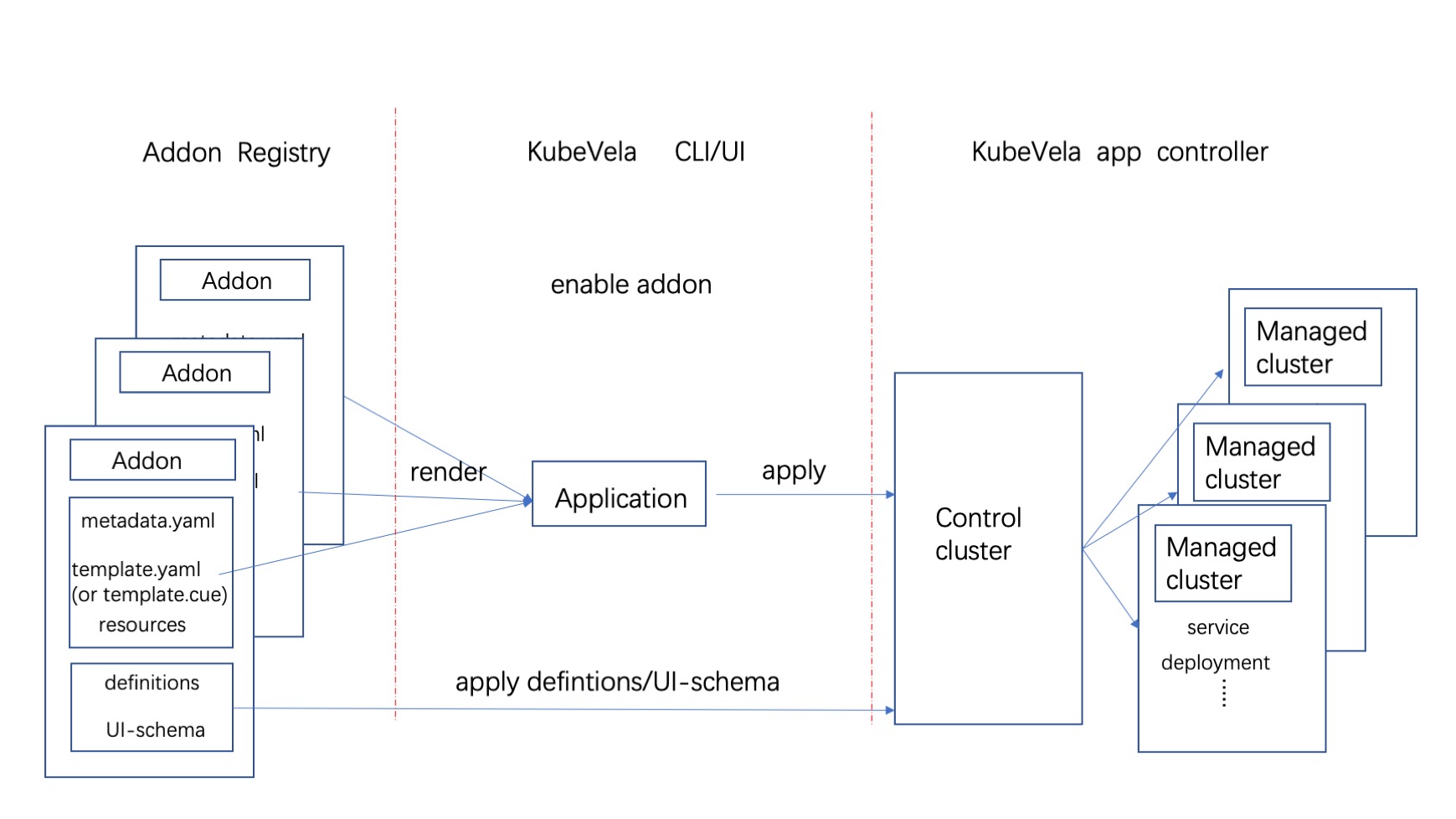
KubeVela's own releases don't pin addon versions. Each addon carries its own version in the catalog, and its metadata.yaml says which KubeVela versions it works with; the KubeVela Compatibility page lists them.
Verified and experimental
The catalog has two registries:
| Registry | Source | Registered by default | Enable with |
|---|---|---|---|
KubeVela | addons/ | Yes, by the vela-core chart | vela addon enable <name> |
experimental | experimental/addons/ | No | vela addon enable experimental/<name>, once you've added it |
Every addon starts as experimental. It's promoted to verified once the catalog's CI shows it enables cleanly and it has a page in these docs. Both registries are published to GitHub Pages from the catalog's master branch on every merge, at https://kubevela.github.io/catalog/official and https://kubevela.github.io/catalog/experimental.
You can run your own registry too, in an OCI registry, a Helm repository, Git or a bucket. See Build your Own Registry.