Overview
The User Management feature only works when you're using VelaUX UI console.
Once VelaUX is installed, there's a built-in administrator user with full access to the system. It is recommended to use the admin user only for the initial configuration, then switch to another user or configure the SSO integration.
Local users/accounts
The local users/accounts feature serves two main use-cases:
- For scripts and other API clients: create a local user with only the roles it needs, then get a token with
POST /api/v1/auth/loginand{"username": "...", "password": "..."}. Send theaccessTokenasAuthorization: Bearer <token>; it lasts an hour, andGET /api/v1/auth/refresh_tokenwith theRefreshTokenheader returns a new one-hour token, until the refresh token expires 24 hours after login. - For a small team, where SSO would be overkill, local users can be the only way to sign in.
Get full users list
Users with User Management permission see Admin Dashboard > Users, which lists every user.
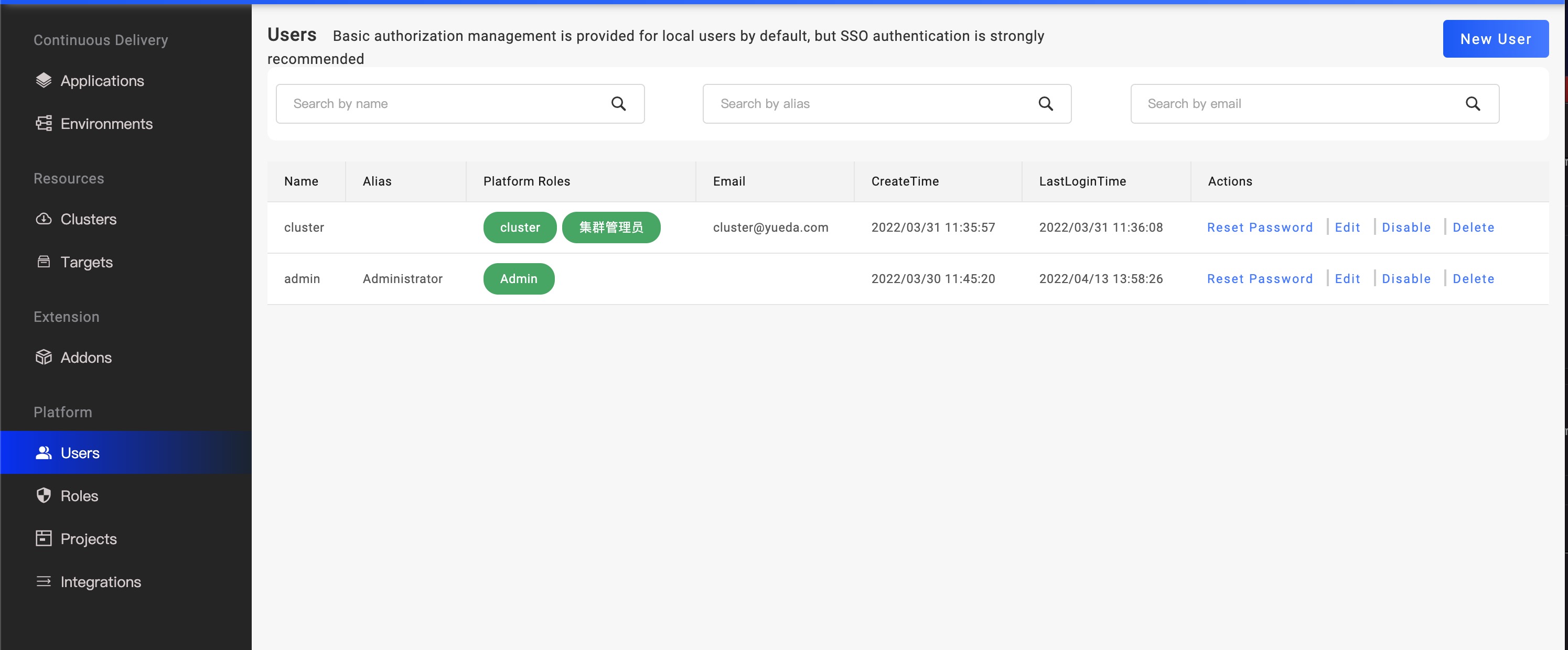
The list shows each user's name, alias, platform roles and last login time.
Creating users
Click the New User button, you can open the drawer page for creating a user. Fill in the required fields, such as the user's name, email and password. Click the Create button then complete.
Enable/disable users
You can click the disable or enable button, it could set the user's status. If a user is disabled, this user can not login.
Reset user's password
You can click the reset password button and input a new password then commit it.
Updating users
For existing users supports updating alias and platform role information. If a user has an empty email, support set a new email.
SSO
SSO is our recommended way, please refer to SSO login document.