VelaUX
VelaUX provides the UI console of KubeVela.
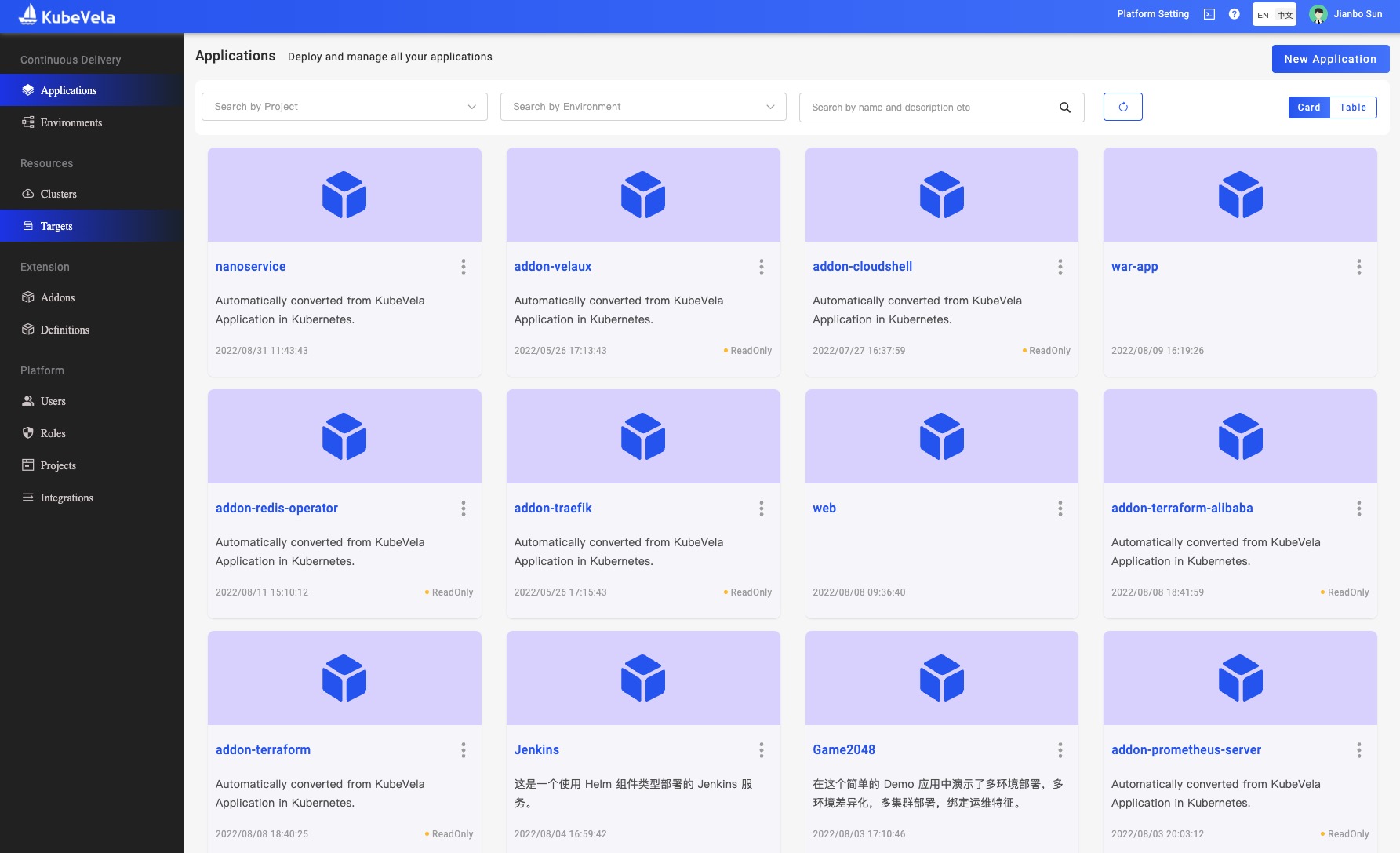
Install
vela addon enable velaux --version v1.7.6
expected output:
Addon: velaux enabled Successfully.
VelaUX needs authentication. The default username is admin and the password is VelaUX12345. Please must set and remember the new password after the first login.
By default, VelaUX didn't have any exposed port.
Visit VelaUX by port-forward
Port forward will work as a proxy to allow visiting VelaUX dashboard by local port.
vela port-forward addon-velaux -n vela-system
Choose > local | velaux | velaux for visit.
Setup with Specified Service Type
There are three service types for VelaUX addon which aligned with Kubernetes service, they're ClusterIP, NodePort and LoadBalancer.
By default the service type is ClusterIP for security.
If you want to expose your VelaUX dashboard for convenience, you can specify the service type.
LoadBalancertype requires your cluster has cloud LoadBalancer available.vela addon enable velaux serviceType=LoadBalancerNodePorttype requires you can access the Kubernetes Node IP/Port.vela addon enable velaux serviceType=NodePort
After the service type specified to LoadBalancer or NodePort, you can obtain the access address through vela status:
vela status addon-velaux -n vela-system --endpoint
The expected output:
+----------------------------+----------------------+
|  REF(KIND/NAMESPACE/NAME)  |       ENDPOINT       |
+----------------------------+----------------------+
| Service/vela-system/velaux | http://<IP address> |
+----------------------------+----------------------+
Setup with Ingress domain
If you have ingress and domain available in your cluster, you can also deploy VelaUX by specify a domain like below:
vela addon enable velaux domain=example.domain.com
The expected output:
I0112 15:23:40.428364   34884 apply.go:106] "patching object" name="addon-velaux" resource="core.oam.dev/v1beta1, Kind=Application"
I0112 15:23:40.676894   34884 apply.go:106] "patching object" name="addon-secret-velaux" resource="/v1, Kind=Secret"
Addon: velaux enabled Successfully.
Please access the velaux from the following endpoints:
+----------------------------+---------------------------+
|  REF(KIND/NAMESPACE/NAME)  |         ENDPOINT          |
+----------------------------+---------------------------+
| Ingress/vela-system/velaux | http://example.domain.com |
+----------------------------+---------------------------+
If you enabled the traefik addon, you can set the gatewayDriver parameter to use the Gateway API.
vela addon enable velaux domain=example.doamin.com gatewayDriver=traefik
If you want to enable VelaUX with SSL:
- Create the certificate configuration:
apiVersion: core.oam.dev/v1beta1
kind: Application
metadata:
  annotations:
    config.oam.dev/alias: "VelaUX SSL Certificate"
  labels:
    app.oam.dev/source-of-truth: from-inner-system
    config.oam.dev/catalog: velacore-config
    config.oam.dev/type: config-tls-certificate
  name: velaux-cert
  namespace: vela-system
spec:
  components:
  - name: velaux
    properties:
      cert: <CERT_BASE64>
      key: <KEY_BASE64>
    type: config-tls-certificate
Please make sure the certificate matches the domain.
- Enable VelaUX with domain
vela addon enable velaux domain=example.doamin.com gatewayDriver=traefik secretName=velaux-cert
Setup with MongoDB database
VelaUX supports Kubernetes and MongoDB as the database. the default is Kubernetes. We strongly advise using the MongoDB database to power your production environment.
vela addon enable velaux dbType=mongodb dbURL=mongodb://<MONGODB_USER>:<MONGODB_PASSWORD>@<MONGODB_URL>
You can also deploy the MongoDB with this application configuration:
Your cluster must have a default storage class.
apiVersion: core.oam.dev/v1beta1
kind: Application
metadata:
  name: velaux-db
  namespace: vela-system
spec:
  components:
    - name: velaux-db
      properties:
        chart: mongodb
        repoType: helm
        url: https://charts.bitnami.com/bitnami
        values:
          persistence:
            size: 20Gi
        version: 12.1.12
      type: helm
  policies:
    - name: vela-system
      properties:
        clusters:
          - local
        namespace: vela-system
      type: topology
  workflow:
    steps:
      - name: vela-system
        properties:
          policies:
            - vela-system
        type: deploy
After deployed, let's get the root password from the secret vela-system/velaux-db-mongodb.
Specify the addon image
By default the image repo is docker hub, you can specify the image repo by the repo parameter:
vela addon enable velaux repo=acr.kubevela.net
You can try to specify the acr.kubevela.net image registry as an alternative, It's maintained by KubeVela team, and we will upload/sync the built-in addon image for convenience.
This feature can also help you to build your private installation, just upload all images to your private image registry.
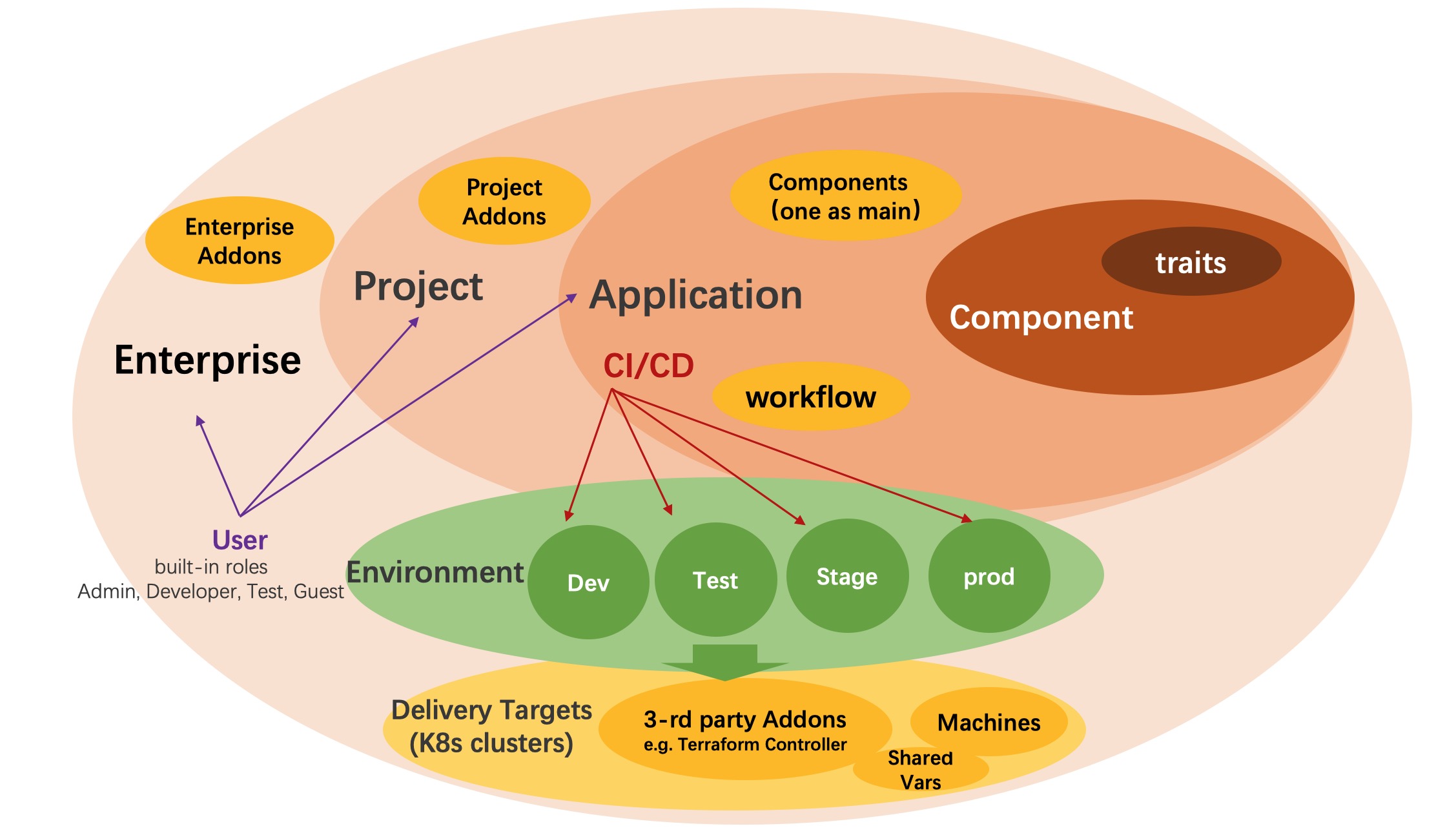
Concept of VelaUX
VelaUX is an addon on top of KubeVela, it works as UI console for KubeVela, while it's also an out-of-box platform for end-user.
We add some more concepts for enterprise integration.
Project
Project is where you manage all the applications and collaborate with your team member. Project is one stand alone scope that separates it from other project.
Environment
Environment refers to the environment for development, testing, and production and it can include multiple Delivery Targets. Only applications in the same environment can visit and share resource with each other.
- Bind Application with Environment The application can be bound to multiple Environments, and for each environment, you can set the unique parameter difference for each environment.
Delivery Target
Delivery Target describes the space where the application resources actually delivered. One target describes one Kubernetes cluster and namespace, it can also describe a region or VPC for cloud providers which includes shared variables and machine resources.
Kubernetes cluster and Cloud resources are currently the main way for KubeVela application delivery. In one target, credentials of cloud resources created will automatically delievered to the Kubernetes cluster.
Application
An application in VelaUX is a bit different with KubeVela, we add lifecycle includes:
- Create an application is just create a metadata records, it won't run in real cluster.
- Deploy an application will bind with specified environment and instantiate application resource into Kubernetes clusters.
- Recycle an application will delete the instance of the application and reclaim its resources from Kubernetes clusters.
- Delete an application is actually delete the metadata.
The rest concept in VelaUX Application are align with KubeVela Core.